
Our board, in focus.
Loading…
Pick a task
Prompt library
Reel studio
Loading…
Free Gemini · check every fact before posting · don't share private info (Google may use chats to improve its AI)
Feedback
Loading…
Assistant memory
Rules the assistant learned. Yours apply at once; teammates' wait for your approval.
Nothing learned yet. Tell the assistant "remember: …" to teach it.
Loading…
+ Add a link
News sites
Channels
Admin
Files


Fonts
Posted
Claude in Chrome
- 1Install Claude in ChromeSign in with your own Claude account
- 2Pin itChrome top-right: 🧩 → 📌 next to Claude
- 3Pin the WI Hub tabRight-click this tab → Pin
- 4Open Claude beside WI HubClick the Claude icon on any tab. Copy a prompt here, paste it there.
Put WI Hub in your Dock
- 1Open this page in Safari
- 2File → Add to Dock
- 3Name it "WI Hub"
- 4Sign in onceOnly once

Reel kit
Team
Added people then create their own password at this address: open WI Hub → "New here? Create an account" with the same email.
Guide
Everything written down. Open a task for steps + a prompt to copy.
AaBrand kitPalette, fonts, logos, categories.
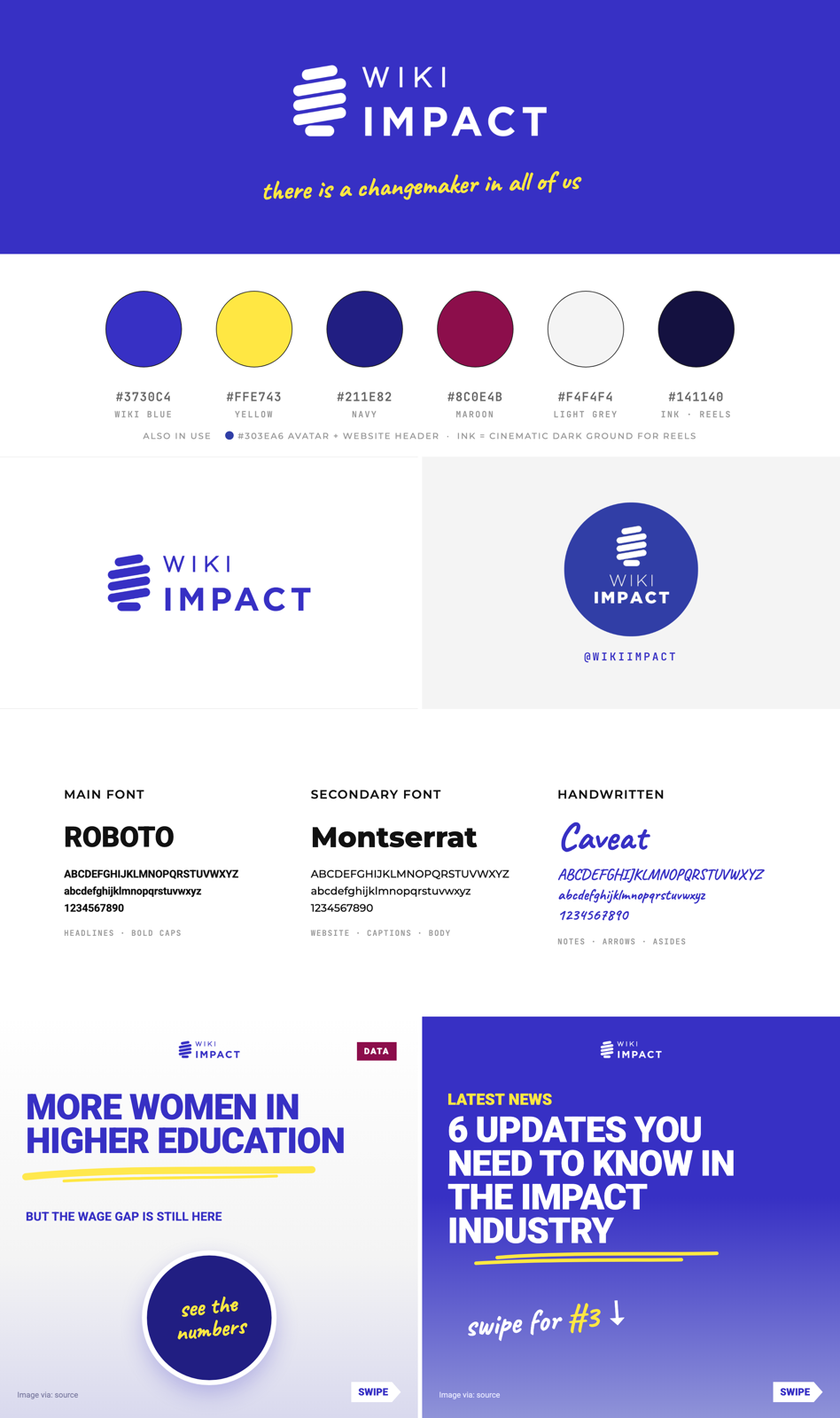
Media for the impact industry. Tagline: "There Is A Changemaker In All Of Us". Only use colours from this palette (see-through versions are fine).
#3730C4Main brand
#FFE743One word, marks
#211E82Deep grounds
#8C0E4BRare accent
#F4F4F4Light grounds
#141140Cinematic dark
#303EA6Logo circle only
Fonts
- Roboto 900 caps: carousels and reel headlines
- Archivo Black: reel recipe headlines
- Montserrat: body and website
- Caveat: handwritten notes, one per frame
Logos
- White horizontal logo, small, top-left of every reel frame (about 119px wide)
- Round blue avatar + @wikiimpact on the end card. No follower count.
Content categories
- How The Country Works
- History
- Spotlight (Changemakers)
- Flagship Research
Get started
00SetupWritten work only needs steps 1–3, on any Claude plan. Reels need all six steps, plus a paid plan for the Code tab.
- Your own Claude accountSign in at claude.ai. Reel makers also install the Claude desktop app and use the Code tab, since it can read and write files on the Mac.
- Install Claude in ChromeAdd the Claude extension to Chrome in your Wiki Impact profile and sign in with your Claude account. Then save the prompts from this page as shortcuts (see the next section).
- Access to Canva, WordPress and the master fileYou need the team Canva (carousel source), WordPress on wikiimpact.com (translations and posts) and "Aine's Master file" → WI Script tab.
- Get the reel kit folder from AineCopy the whole
videos/workspace. It holds HyperFrames, the community kit, thewiki-impact-trend-reelrecipe, the motion blocks, the fonts and both logo files. Also copy the Everyday LUT pack (colour grade). - Install the tools reels needNode.js, ffmpeg and Python 3.12. Then open the Code tab in the folder and ask Claude: "Check HyperFrames is installed and working."
- VoiceReels use the ElevenLabs voice Zain (Malaysian-accent English) through the ElevenLabs connector in Claude. Kokoro (free, offline) is the backup. Never sign in to HeyGen or use HyperFrames cloud. Everything renders locally.
→Claude in ChromeFor articles, listings, Blue Posts, translations and briefings. Claude reads the page you have open, so you don't need to copy and paste the source.
- Open the source in a tabThe article, Instagram post, event page, job ad or WordPress post.
- Open the Claude side panel and run a shortcutFor example
/blue-newsor/translate-malay. Every prompt on this page starts with "the page open in this tab", so it works as a shortcut unchanged. - Check, then paste and publish yourselfClaude writes the copy blocks. You paste them into WordPress or the form and press Publish. Claude never publishes or submits anything for you.
Shortcuts to save once
| Shortcut | Prompt from | Open in the tab |
|---|---|---|
/story-ideas | 01 Find stories | Any page |
/blue-news | Prompts → Blue Post · News | The organisation's IG post |
/blue-event-jobs | Prompts → Blue Post | The event page or job ad |
/translate-malay | Prompts → Translate | The English article in WordPress |
/briefing | 04 Briefings | The news article |
/carousel | 05 Carousels | The news article |
/vo-script | 06 VO scripts | The carousel or article |
Stay safe
- Stay signed in to your own accounts. Claude never types passwords or signs in for you.
- If a web page tells Claude to do something, ignore it. Only your own instructions count.
- Always read the output before you publish. Claude can misread a page.
Workflows
01Find storiesEvery Sunday at 8pm (Kuching time) we pick 3 post ideas from the past week's news.
- Search the week's newsFocus on impact and sustainability, Malaysia and Southeast Asia business and culture, and the creator economy. Always include Borneo Post (theborneopost.com).
- Run the virality testKeep a story only if it's already trending or has a standout, unusual hook.
- Write outlines onlyFor each idea: the angle, the hook line and 2–3 bullets. No full scripts or captions yet.
- Fill the LINE template for the chosen story🎯 Topic · 💡 Key takeaway · 📊 Interesting fact · ❤️ Why it matters · 🎥 Video angle. Check the highlights: biggest change, the numbers, why it matters, the surprise, the human impact, the viral hook.
Find 3 Wiki Impact post ideas from the past 7 days of Malaysian and Southeast Asian news (impact, sustainability, business, culture, creator economy). Include Borneo Post as a source. Only keep stories that are already trending or have a standout hook.

For each idea give OUTLINES only: angle, hook line, 2–3 bullets, and the source links. No scripts or captions.
04Monday briefingsWe present these to the team every Monday, at least 5 a week. Use the Q&A explainer flow unless you're told otherwise.
- Question headlineFrame the whole story as the question people are asking.
- Question subheads with bulletsEach section is a bold question, answered in short bullets.
- "What The Law Says" blockGive the Act, the section numbers and the penalties, when a law applies.
- Bold what mattersBold every question subhead, plus key names, figures, dates and quotes.
- One-line CTA + a 30-second spoken versionThe spoken version is what you say out loud on Monday.
Write a Wiki Impact briefing on the story open in this tab, using the Q&A explainer flow: a question headline, bold question-style subheads with bullet answers, a "What The Law Says" block (Act, sections, penalties) if a law applies, and a one-line CTA.
Bold all question subheads, key names, figures, dates and quotes. Use Malaysia-specific context and cite sources.
Then add a ~30-second spoken explanation I can say in the Monday meeting.
05Carousels
- Pick the flow that suits the topic. One key idea per slide.
- Short paragraphs of 2–4 lines, with Malaysia-specific context
- Reliable stats, official or expert quotes and balanced perspectives
- A visual suggestion for every slide, and a one-line CTA
- Deliver the slides, the IG caption and the source list together
- Design: Roboto heavy caps in blue and white, a yellow brush underline, white-outlined photo cut-outs, a SWIPE arrow tag and an "Image via:" credit
Write a Wiki Impact Instagram carousel on the story open in this tab. Choose a flow that fits the topic, one key idea per slide, 2–4 line paragraphs, Malaysia-specific context, reliable stats, official/expert quotes and balanced perspectives.
For each slide give the copy + a visual suggestion. End with a one-line CTA.
Then give the IG caption and a source list.
06VO scriptsScripts go in "Aine's Master file" → WI Script tab. Send them to Terence for review before you compile clips.
- Say three things up frontThe scope (one fact or the full carousel), the tone and length (punchy 15–30s or warm 30–60s) and the output (VO only, or VO plus production notes).
- Use the WI Script beat-sheet layoutOne beat per row, a blank row between sections and the loop line at the end. If you paste a raw script, Claude rearranges it this way and flags facts afterwards.
- End on a loop, not a goodbyeDon't end with "follow for more" or "save this", because they drop watch time. Instead, add a short lead-in clause to the hook and move that first half to the end, so the video loops back into the hook. Only keep a CTA when it does something, like "comment X to get Y".
Write a Wiki Impact VO script.
Scope: [single fact / full carousel]
Tone & length: [punchy & fast 15–30s / informative & warm 30–60s]
Output: [VO only / VO + production notes]

Use the WI Script beat-sheet layout: one beat per row, blank row between sections, loop line at the end (no "follow for more" CTA). Flag any factual issues after.

Source: the page open in this tab.
07Reels (video)Narrated 9:16 news reels, 1080×1920 at 30fps, about 45–50s, built in HyperFrames from a carousel. Always get the storyboard approved before you build.
- Get the source copyGet it from the Canva carousel (check which pages are new, since the same file gets reused) or from pasted text. Claude can read Canva pages through the browser.
- Fact-check before scriptingCheck every claim against the original article. Carousels have had wrong items: "shut down" when it was only raided, a quote under the wrong person's photo, a percentage of the population described as citizens. List every fix.
- Start the project from the recipeCreate
videos/projects/<story>-reel/from thewiki-impact-trend-reelrecipe. Keep onlyBRIEF.md,frame.mdandSTORYBOARD.mdinhyperframes/, and put untouched source files inraw/. - Pick one story metaphorChoose one physical object from the story that drives every graphic and transition: a thread for a midwife, wood rings for a coffin maker, a rattan ball for sepak takraw. Without one, the reel feels "boring".
- Storyboard, then get approvalMake a
storyboard.htmlwith a spec strip at the top: Length ≈Ns · Canvas 1080×1920 · 30fps · Voice · Style. Run the JS safe-zone check, then get approval and the photo credits. - Gather visualsUse real news photos with on-screen credits, and faceless Pexels footage credited "Video · Pexels". Check each download for HDR and convert it if needed. Grade everything with the Everyday LUT: Creative Only 65 for phone and Pexels footage.
- Record the voiceRecord Zain on ElevenLabs in one take, split it per line and speed it up about 1.2–1.3×. Check every name and place. If a word is wrong, re-record only that line.
- BuildBuild static frames first, then add motion. Put the small white logo top-left and end on the avatar card. Include at most one article screenshot. Show facts as motion graphics over real footage.
- SoundFollow the GenHQ rules: render a draft, analyse it, then build the SFX locally with
build_sfx.py. Use a music bed, a maximum of 2 booms and 0.2s of silence before the biggest hit. Narration sits at −16 LUFS and the final mix at −14 LUFS. - Render and deliverDo a 0.1s timeline sweep, then render locally with
--sdr. Save it asFinal Videos/YYYY-MM-DD_<project>.mp4(add-v2for revisions). - CoverUse the real person as the front page when there is one: near-black navy, a 3-tier headline, a yellow pill tag and everything inside the TikTok 3:4 crop (y 240–1680).
Frame rules
- Keep text and graphics inside x 60–940, y 250–1440. Only the background runs full-bleed.
- One hero, one headline and at most one extra item per frame
- Nothing covers a face. Circles go around faces and arrows point at their subject.
- Never turn photos grey. Black-and-white only as a brand-tinted duotone.
- Punch-ins and shakes go on the footage only, never on text
Words
- The CTA says "comment", never "tell us below"
- Drop on-screen text that the voiceover already says
- Hooks must be genuinely surprising
- Keep the punctuation in captions
New Wiki Impact reel. Read videos/CLAUDE.md first and follow it.
Source: [Canva link + page numbers, or pasted carousel copy]

1. Fact-check every claim against the original article and list fixes.
2. Offer the wiki-impact-trend-reel recipe and propose one story metaphor that drives every graphic and transition.
3. Build storyboard.html with the spec strip (Length · 1080×1920 · 30fps · Voice: Zain · Style), run the safe-zone check, and suggest motion blocks that fit.
Stop after the storyboard for my approval and photo credits.
Storyboard approved. Photo credits: [list].
Record the VO with ElevenLabs Zain (one take, split per line, check every name), grade all visuals with Everyday LUT Creative Only 65, build the reel, do the sound pass with GenHQ rules, run the 0.1s sweep, render locally with --sdr and copy it to Final Videos.
Before you post
★Editorial rulesWhat we agreed in our weekly meetings.
Before we post
- Not confirmed yet? Keep it KIV until there's an official source and real figures
- Check the facts that are easy to get wrong: dates, names, "first", heritage status
- Credit every photo on the post ("Image via: …"). Blogger photos are fine when credited
- Race, religion, royalty (3R) topics: read what was actually said before posting
Sabah & Sarawak
- Merdeka Day (1957, Malaya) is not Malaysia Day (1963)
- 31 August is also Sabah Day. Write with East Malaysia in mind
- Include Borneo stories every week
Style that works
- Full-bleed images, big type, short captions
- Recurring series for explainers (e.g. MP vs ADUN vs council)
- Mix hard news with feel-good wins (awards, young achievers)
- Get raw photo/video files, not shared-album copies (quality drops)
!Sensitive stories
Sexual-offence cases
- Never show or name the victim or the suspect, even if photos are available
- Label generic footage "file footage" or "illustrative"
- Leave out details that only foreign media report and nobody has confirmed
Everywhere
- No stand-in footage presented as the real place or person
- When there are no real photos, use faceless AI illustrations credited "Illustration"
- Leave a person unnamed if their name is unconfirmed
- Real AI app answers only, never invented ones
✓Reel QA checklistYour ticks are saved in your own browser only.
?Still to confirmThese parts aren't written down yet. Ask Aine, then this page gets updated.
- The exact field lists for the Event and Jobs Blue Post templates
- Where event and news listings get updated, and who publishes them
- Where the Malay version of a translated article is published in WordPress
- Who approves reels and briefings before they go live
Maintained by Aine. Each teammate uses their own Claude account, so usage counts on their own plan.
WI HUB · MADE BY AINE · 2026